
I saved a file but another user can't see my changes:
Something is off with syncing, either yours or the receivers.
Check 1: Check your OneDrive status. You can do this with the little blue cloud in the bottom right of your taskbar:

1. If it is solid blue, that means everything is up to date.
2. If it has the little white circle with arrows, that means it’s currently syncing something. If you click on it, a status page will open and you can see if there are any errors you need to resolve (which might be part of the problem), or if things are just still syncing then likely your saves haven’t made their way back to the cloud yet.
3. If there's a red X next to the cloud, that means there's some issue you need to resolve. Click on the icon to see more information about what the issue is.
4. If the blue cloud is not there, then OneDrive isn't running and nothing is actively syncing and that's the problem. To start OneDrive again, search for OneDrive in your start menu, and then select the one labeled App: 
Nothing will pop up, it will just start in the background and you should see the blue cloud in your taskbar again shortly.
Check 2: Check on the document itself. If you’re syncing/accessing through File Explorer, there should be a status column next to the document name: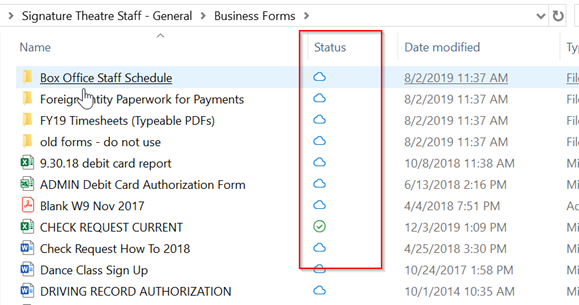
If that column isn't there, or there's nothing in it, then that folder/file isn't syncing and OneDrive needs to be turned on.
What do the status symbols mean? See this article.
My folders have disappeared from File Explorer
Check to see if OneDrive is running. If not, then start it. If it is and that still doesn’t fix the problem, I’ve found that if you go through the process of initially syncing one of the folders, it kicks OneDrive into remembering all the sync relationships.
The status column is gone next to my folders
Check 1: Make sure OneDrive is running. If not, start it again.
Check 2: OneDrive is running but there's still no status. Check to make sure you aren't syncing that folder already in a different location. This could happen if you initially only sync a sub-folder, but then later sync the main folder. That sub-folder is then trying to sync to two different places (once on its own and once under the main folder), which could cause some problems. Check and see if the folder exists somewhere else, and if it does and is syncing properly, then remove the duplicate folder.
Check 3: OneDrive running, no duplicates, still no status. Try re-doing the steps that you completed to set up the sync of that folder initially. It's possible the sync relationship got broken and you just need to restart it.
Comments
0 comments
Please sign in to leave a comment.